
How Much Does It Cost to Start Selling on Shopify Explained
- October 13, 2025
- Shopify
Estimated reading time: 10 minutes
Key Takeaways
- A functioning Shopify store can launch for $300–$600 in the first year, though barebones store setups may cost less.
- Core costs include your Shopify plan, custom domain, themes, and apps—with advanced features or physical POS adding to your budget.
- Most new sellers will choose the Basic plan, a custom domain, and some essential apps for credibility and functionality.
- Expert advice: start lean with free themes and apps, scaling up paid features only when your business demands them.
Table of Contents
- Shopify Pricing Plans: Your Foundation
- Transaction Fees: The Cost of Doing Business
- Shopify Domain Name: Establishing Your Brand
- Enhancing Functionality: Shopify Apps
- The Look and Feel: Shopify Themes
- Considering Physical Retail: Shopify POS Costs
- Beyond the Essentials: Additional Costs to Factor In
- Strategic Planning: Taking Action
- Conclusion
Shopify Pricing Plans: Your Foundation
As a seasoned business operator, I’ve seen countless entrepreneurs navigate the complexities of launching an online store. One of the most common initial hurdles is understanding the true financial commitment. So, how much does it cost to start selling on Shopify in 2025?
The short answer is that while you can technically get a Shopify store up and running for as little as $1 per month for the first three months, or $5 per month for the Starter plan, a realistic initial budget for a functional and trustworthy online store typically falls in the range of $300 to $600 for the first year. This accounts for essential elements like a custom domain, a solid theme, and a few critical applications.
Let’s break down the various cost components you’ll encounter on your Shopify journey.
Your Shopify subscription is the bedrock of your online store. Shopify has structured its plans to cater to businesses at different stages, from a side hustle to a full-fledged enterprise.
Currently, Shopify offers a trial where new users can try the platform for free for three days, followed by a promotional period of $1 per month for the first three months. After this introductory offer, the standard pricing plans kick in.
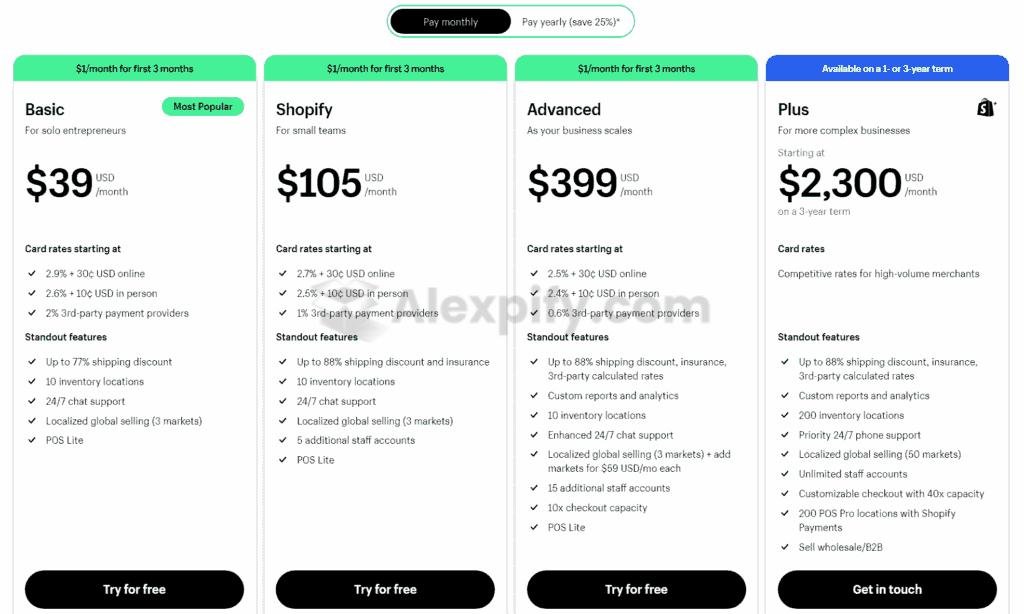
Here’s a look at the core plans and what they generally entail:
- Starter Plan ($5/month): This plan is designed for individuals who want to sell products through social media, messaging apps, or by sharing links, without needing a full online storefront. It's a very lean option for testing the waters.
- Basic Plan ($39/month, or $29/month when billed annually): This is often the sweet spot for new businesses launching their first dedicated online store. It provides access to theme editing, product pages, blogging functionality, and all the essential tools to get selling. Most new stores opt for this plan, offering a good balance of features and cost efficiency.
- Grow Plan ($105/month): Formerly known as the "Shopify Plan," this tier is for small teams with increasing sales volume. It includes professional reports and slightly lower transaction fees than the Basic plan.
- Advanced Plan ($399/month): Geared towards growing businesses with steady sales, multiple inventory locations, and a need for custom reports, advanced analytics, and priority support.
- Plus Plan (Starting at $2,300/month): This enterprise-level solution is for large-scale ecommerce operations, offering enhanced checkout capacity, unlimited staff accounts, numerous inventory locations, and dedicated support.
As you can see, the entry point is quite accessible, but it scales significantly with your business needs. For most startups, I advise budgeting for the Basic plan after the introductory period, as it provides the necessary features for a professional online presence.
Transaction Fees: The Cost of Doing Business
Beyond the monthly subscription, transaction fees are a recurring cost that directly impacts your profit margins. These fees vary depending on your chosen Shopify plan and the payment gateway you utilize.
If you use Shopify Payments, Shopify’s native payment processor, the transaction fees are typically lower. For third-party payment gateways, Shopify often adds an additional fee.
Here's a general breakdown of transaction fees with Shopify Payments:
- Starter Plan: 5% per transaction.
- Basic Plan: 2.9% + $0.30 per transaction.
- Grow Plan: 2.75% + $0.30 per transaction.
- Advanced Plan: 2.5% + $0.30 per transaction.
- Plus Plan: 2.15% + $0.30 per transaction.
It's clear that as you move up the plan tiers, the percentage-based transaction fees decrease. While these fees might seem negligible with a few sales, they can quickly add up as your order volume increases. When considering an upgrade, I always recommend projecting your sales volume to see if the savings on transaction fees outweigh the higher monthly plan cost. It’s a common misconception that these are "hidden" fees; Shopify is quite transparent about them on their pricing pages.
Shopify Domain Name: Establishing Your Brand
A professional domain name is crucial for credibility. While Shopify provides a free 'yourstore.myshopify.com' domain, I strongly advise against using it for a customer-facing brand, as it appears unprofessional and untrustworthy.
You have two primary options for a custom domain:
- Purchase through Shopify: A standard .com domain through Shopify typically costs around $16 per year.
- Purchase from a third-party registrar: Providers like Namecheap offer .com domains for around $9.98 per year, which can be a more cost-effective option. You can then easily link this domain to your Shopify store for free.
I consider a custom domain a non-negotiable expense for any serious online business. Budgeting around $10-$20 per year is a small price to pay for brand legitimacy.
Enhancing Functionality: Shopify Apps
Shopify’s core platform is robust, but its strength lies in its extensive App Store, which allows you to extend your store’s functionality significantly. From email marketing to dropshipping order fulfillment, there’s an app for almost everything.
Many essential functions, such as advanced email marketing, upselling, or robust product reviews, often require third-party apps because Shopify’s built-in capabilities might be limited in these areas.
Here's a snapshot of common app categories and typical costs:
| App Category | Best Free Option | Cost (Free) | Best Paid Option | Cost (Paid) |
|---|---|---|---|---|
| Email Marketing | Klaviyo | $0/month | Klaviyo | $20/month |
| SMS Marketing | SMSBump | $0/month | SMSBump | $19/month |
| Social Proof (Sales Notif.) | Proof Bear | $0/month | Prove Source | $29/month |
| Social Proof (Reviews) | Judge.me | $0/month | Loox | $9.99/month |
| Social Proof (Trust Badges) | ShopClimb | $0/month | TrustedSite | $39/month |
| Urgency (Countdown Timer) | TimexBar | $0/month | Hextom | $9.99/month |
| FAQ Page | HelpCenter | $0/month | Zendesk | $49/month |
| Dropshipping Order Proc. | DSers (AliExpress) | $0/month | AutoDS | $12.90/month |
| GDPR Compliance | Consentmo GDPR Compl. | $0/month | Consentmo GDPR C. | $8/month |
Many free versions of these apps offer enough functionality to get started. As your business grows and your needs become more sophisticated, you can upgrade to paid plans. I typically advise clients to start with free apps and only invest in paid ones when a clear ROI can be demonstrated. Expect to budget anywhere from $0 to $200 per month for apps, depending on your specific requirements. Realistic spending for essential apps is often around $20-$50 per month.
The Look and Feel: Shopify Themes
Your store’s design plays a critical role in customer experience and conversion rates. Shopify offers a range of themes, both free and paid, to help you create an appealing storefront.
- Free Themes: Shopify provides several high-quality, free themes like Sense, Dawn, and Refresh. These themes are well-designed, easy to customize, and integrate seamlessly with Shopify’s ecosystem. For a new business, a free theme is an excellent starting point.
- Paid Themes: Paid themes, often costing between $150 and $400 (one-time fee for a lifetime license) or $29-$150/month for subscription-based themes like Debutify, generally offer more advanced features, greater customizability, and specialized layouts. Some premium themes can even reduce the need for certain paid apps by including features like upsell widgets or multi-language support. Popular paid options include Booster Theme and Turbo Theme, which are known for their conversion-boosting capabilities.
When considering a paid theme, weigh its unique features against its cost and whether it truly aligns with your brand and functional needs. Remember that Shopify also offers an AI Website Builder for design inspiration, and external tools like PageFly can be used for landing page creation.
Considering Physical Retail: Shopify POS Costs
If you plan to integrate your online store with a physical retail location, Shopify POS (Point of Sale) becomes relevant. For purely online businesses, this won’t be a factor.
Shopify offers two POS plans:
- POS Lite ($0 - included with Basic, Shopify, and Advanced plans): This allows you to sell products in one physical location and is sufficient for basic in-person sales.
- POS Pro ($89/month): This plan provides more advanced in-person selling tools, including staff management, detailed customer profiles, and lower transaction fees. It's automatically included with the Plus plan.
If you’re on the Basic, Shopify, or Advanced plan and need the enhanced features of POS Pro, you'll pay an additional $89 per month. Evaluate if the advanced features justify the extra expense for your physical operations.
Beyond the Essentials: Additional Costs to Factor In
Launching a Shopify store involves more than just the platform itself. There are other crucial areas where you might incur costs, which are important to budget for:
- Logo Creation: Shopify offers a free logo generator, which is fine for a quick start. However, if you desire a more professional and unique brand identity, you might invest in a custom logo from platforms like Fiverr or Upwork, typically ranging from $50 to $500.
- Website Design and Development: While many can set up a Shopify store themselves with free themes, if you lack the skills or time, hiring a freelance designer can cost between $50 and $500 for a basic setup. More complex custom development could run into thousands.
- Payment Processor Fees (if not using Shopify Payments): If you choose a third-party payment processor like Stripe, you'll encounter their specific fees, which typically range from 0.15% to 3.49% per transaction, plus a small fixed fee (e.g., $0.30). Be aware that Shopify charges an additional 2% transaction fee when you use a third-party payment gateway instead of Shopify Payments.
- Inventory Costs: This is a big one. For dropshipping or print-on-demand models, your initial inventory cost can be $0. If you’re purchasing inventory upfront, this could range from $0 to $2,000+ initially, and will be an ongoing expense.
- Product Photography: You can do this yourself for free with a smartphone, but professional product photography can significantly enhance your store’s appeal. This could be an expense of $500+ depending on the scale and quality desired.
- Marketing and Advertising: While organic marketing (SEO, social media) can be free, paid advertising (Google Ads, social media ads) will require a budget. A modest starting budget might be $200-$500 per month, increasing as you scale.
- Business Registration and Legal Fees: Registering your business (e.g., LLC) and consulting with legal professionals will incur costs, often $50-$500+, depending on your location and business structure.
- Website Maintenance and Support: As your store grows, you might need assistance with technical issues, product updates, or customer support. While Shopify provides tools, dedicated help can be an additional cost, potentially $50-$200 per month for ongoing support.
Shopify does offer many free tools (logo makers, name generators, etc.) that can help mitigate some of these additional expenses, especially when you're just starting out.
Strategic Planning: Taking Action
Knowing the costs is one thing; acting on that knowledge is another. Here’s my advice for making informed decisions:
- Define Your Budget: Before anything else, establish a clear budget. This will dictate your choice of Shopify plan, themes, apps, and how much you can allocate to marketing and other additional costs.
- Understand All Cost Components: Be fully aware of the monthly recurring costs (plan, apps) and the one-time or annual costs (domain, theme purchase, initial inventory).
- Prioritize Free Options Initially: Whenever possible, start with free Shopify themes and apps. Upgrade only when the free versions no longer meet your needs or when a paid option offers a clear, measurable benefit to your business.
- Embrace a Lean Startup Approach: For new sellers in 2025, it's wise to start lean. Using dropshipping or print-on-demand models can significantly reduce upfront inventory costs and risk.
- Project Your Total Outlay: While you can launch a barebones store for as little as $5/month, a realistic first-year outlay for a functional store will be closer to $300-$600. Here’s a general guideline for realistic budgets:
| Budget Style | Setup Cost (One-Time) | Monthly Cost |
|---|---|---|
| Lean/Starter | ~$0–$300 | $5–$29 |
| Basic Online Store | $300–$600 | $75–$150 |
| Growing Brand | $1,000+ | $150–$300+ |
| Larger/Enterprise | $2,000+ | $400+ |
Conclusion
Starting an online store with Shopify in 2025 can be remarkably affordable, especially with their introductory offers. While the platform itself can be as low as $1 per month for a trial period, or $5 for the Starter plan, a sensible approach involves budgeting for a custom domain and potentially a few essential apps. Most first-time sellers will find the Basic Shopify plan at $29/month to be the most practical starting point, leading to a realistic initial investment of $300-$600 to establish a credible online presence. By understanding all the potential costs and making strategic choices, you can launch a robust ecommerce business without breaking the bank.
FAQ
Can you get started selling on Shopify for free?
While technically possible to leverage the free trial, it's not recommended for a sustainable business. To build customer trust and legitimacy, you should at least invest in a custom domain.
Is Shopify overpriced?
Shopify is generally considered one of the most affordable and feature-rich ecommerce platforms available. When you factor in the robust functionality, extensive app store, and ongoing development, it offers excellent value, especially for businesses looking to scale.
Are there any hidden costs with Shopify?
Shopify is transparent about its core platform and transaction fees, which are clearly outlined on their pricing pages. However, "hidden" costs often arise from third-party apps, paid themes, marketing expenses, or professional design services, which are external to Shopify's direct charges. Always review the costs associated with any additional tools you integrate.
What is a realistic budget for a new Shopify store?
For most new online businesses, a realistic startup budget for the first year on Shopify, including a Basic plan, a custom domain, and a few essential apps, typically ranges from $300 to $600. This allows for a functional and professional online presence.
How do transaction fees work on Shopify?
Transaction fees vary by your Shopify plan. If you use Shopify Payments, the fees are lower (e.g., 2.9% + $0.30 on the Basic plan). If you use a third-party payment gateway, Shopify adds an additional fee (typically 2%) on top of what the gateway itself charges.
What's the difference between Shopify Starter and Basic plans?
The Shopify Starter plan ($5/month) is for selling via links on social media or messaging, without a full online store. The Basic plan ($39/month, or $29/month annually) provides a complete online storefront with theme editing, product pages, and blog functionality, making it suitable for dedicated ecommerce businesses.
About us and this blog
Alexpify is a knowledge hub for entrepreneurs who want to master Shopify dropshipping and global e-commerce. Founded by Alex, the blog shares practical guides, real insights, and step-by-step tutorials that simplify online business for everyone — from beginners to full-time digital sellers.

More from my blog
See all posts